Hosting & Servers
Hosting Environment
Section titled “Hosting Environment”The application originally ran on Amazon Web Services. Following the regional AWS outage described in Front-End Scope & AWS Migration, the project was migrated to Digital Ocean, and that migration is permanent: the droplet stood up during the emergency response remains the current production server today rather than a temporary stopgap.
A single Digital Ocean droplet runs the entire production stack: the Laravel application, Nginx, and the PostgreSQL database all run on the same machine. There is no separate database server and no managed database service in front of it.
A staging environment exists and closely mirrors production, but it runs alongside production on that same droplet, distinguished by port (:8080) rather than by being a separate machine. In practice this means staging and production share the same CPU, memory, and disk resources, and maintainers should keep that in mind both when running anything resource-intensive on staging and when deciding how isolated staging’s data needs to be from production’s.
Server Configuration
Section titled “Server Configuration”The droplet is configured with Nginx as the web server, terminating SSL on port 443 in front of the Laravel application.
For local development, the project runs through Docker (docker-compose.yaml), with a dedicated Nginx or Apache container and a separate PostgreSQL container, independent from however staging and production are configured on the droplet itself. This keeps local setup simple and disposable without needing to touch the shared droplet at all.
One dependency was not part of the AWS to Digital Ocean migration: CMS-uploaded images are still served from an Amazon S3 bucket. This is a separate, narrower AWS dependency from the compute and database migration that’s already been completed, and is worth assessing on its own before being treated as fully resolved. See Architecture & Codebase for more detail.
The exact droplet SSH access, and deploy credentials are intentionally not included in this documentation.
Resource Usage & Capacity
Section titled “Resource Usage & Capacity”The production droplet is currently sized at 2 GB RAM and a 50 GB disk, in the BLR1 (Bangalore) Digital Ocean region:

Recent resource usage on this droplet looks like this:
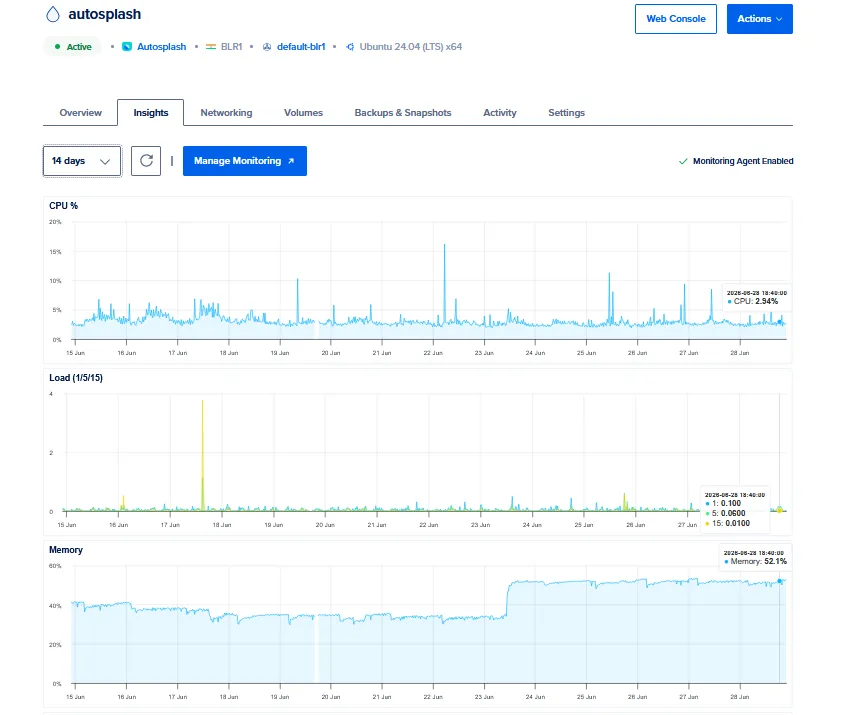
- CPU peaks at around 15% and typically sits closer to 5%.
- Load average is low, around 0.09 to 0.12.
- Memory has consistently run around 33%, but has recently risen to 50 to 52%.
CPU and load both have comfortable headroom. Memory is the one to watch: it has grown noticeably and is now roughly half of the droplet’s total RAM, on a box that also runs staging, Nginx, and PostgreSQL alongside the application itself, as described above.
As a precaution, 2 GB of swap space has been enabled from the droplet’s SSD, so the application has a buffer rather than failing outright if memory usage continues to climb. Swap is meant as a safety net rather than a substitute for adequate RAM, since relying on it under sustained load will be considerably slower than RAM itself.
Recommendation: given the recent rise in memory usage and the fact that this single droplet also carries staging, an upgrade to a larger droplet size is recommended as soon as practical, rather than waiting for memory pressure to become an active problem.
For Non-Developers
Section titled “For Non-Developers”In short: the website and app run on a single server hosted with Digital Ocean. That server was set up during an emergency response to an outage at the previous hosting provider (AWS), and it has since become the permanent home for the site rather than a temporary fix.
There is also a staging copy of the site, used for testing changes before they go live, but it runs on the same server as the live site rather than a separate one. This is a normal setup for a project this size, though it does mean the live site and the staging copy are not fully independent of each other.
If something needs to be reviewed or changed at the hosting level (server access, billing, scaling up if traffic grows), that goes through the development contact listed in Key People & Contacts, since it requires direct access to the server itself.